Mar 8, 2006

Mar 4, 2006


Feb 25, 2006


Feb 24, 2006


Feb 22, 2006


Feb 19, 2006

Feb 18, 2006

Feb 16, 2006

Feb 9, 2006

Feb 4, 2006


Feb 3, 2006


Feb 1, 2006


Jan 21, 2006

Jan 18, 2006

Jan 10, 2006


Jan 2, 2006
Law and Order Overdose
 Ok - so these last 14 days have been an amazing chance to relax, read, reconnect and refresh after a solid year of travel, work and learning.
So how do I spend it? Hours and hours of Law Order. The original L&O series, Criminal Intent, SVU, even Trial by Jury. Julie and I can't get enough of these intense, twist-filled episodes about death, deception and intrigue.
Ok, I did do a few other things during vacation - celebrated Christmas and New Years with family and friends, ran errands, hung a shelf in Jay's room, read most of the Chronicles of Narnia, saw King Kong, had a date night, went up to Hall's house, went night-swimming, and lots of playing with Jay.
Well, tomorrow will be a catch-up day, completing all other tasks before returning to work on Wednesday. It'll be a busy time, essentially a sprint up to the CUE Conference with Macworld, meetings and solving some significant remaining technical challenges for the org all coming between now and March.
As Kramer says..."Giddy-up...."
Ok, I did do a few other things during vacation - celebrated Christmas and New Years with family and friends, ran errands, hung a shelf in Jay's room, read most of the Chronicles of Narnia, saw King Kong, had a date night, went up to Hall's house, went night-swimming, and lots of playing with Jay.
Well, tomorrow will be a catch-up day, completing all other tasks before returning to work on Wednesday. It'll be a busy time, essentially a sprint up to the CUE Conference with Macworld, meetings and solving some significant remaining technical challenges for the org all coming between now and March.
As Kramer says..."Giddy-up...."
Dec 29, 2005

Dec 27, 2005

Dec 17, 2005

Dec 11, 2005

Dec 10, 2005
ah....breakfast
The Starbucks in the lobby of the Sheraton Grand LAX airport hotel.
I got a new Kansas state quarter at this shop.

I got a new Kansas state quarter at this shop.
Nov 22, 2005
My new favorite Jay pic
Jay smiling as we were about to enter the Brea Apple Store on its opening day.


Jul 8, 2005
Dr. is “in”/Conference Planning station Summary
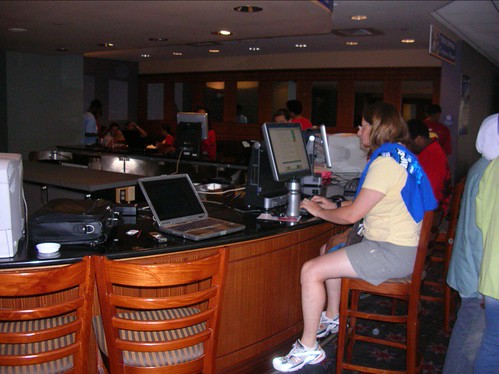
This booth is set up to provide three main services: computer troubleshooting, printing and online conference planning. It is staffed by over 18 year old students from local IT support programs. They wear doctor’s scrubs and offer technical support, advice and troubleshooting duties. They are also called upon to support attendees’ needs with regard to wireless access, handheld program informational download issues, as they arise. You will experience technical glitches in this location, so staff with adult monitors with technical expertise to oversee the student workers. Also – have a direct connection to conference IT staff to address systemic issues.
Be aware of the rush to print out boarding passes on the last day. No concern or disclaimer was offered with regard to damage or loss of data. I’d recommend a clear disclaimer for 2006 to protect against the possibility of inadvertent damage or loss to attendees’ equipment by these student or adult workers.
One issue that arose was printer IP addresses. They were set up to be DHCP and would not operate with personal laptops connected via Ethernet, so they had to reset these printers with fixed IP addresses.
Info Booth Summary
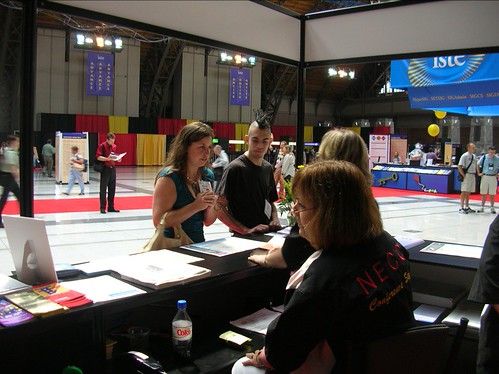
The info booth was situated near the registration, ISTE booth, poster sessions and entrance to the conference sessions, exhibit hall and showcase, not too far from the conference headquarters. Affiliate volunteers, convention center staff and other locals staffed the booth. They distribute additional conference materials, guides, timelines and local information. Be prepared to over-staff during rush periods. Positive attitude, patience and a good sense of humor is highly recommended! For next year, we would suggest to coordinate regularly with “Ask me” staff and to offer the luggage storage for more than the last day of the conference.
Also, be prepared to refer technical questions to appropriate experts. Attendees will assume you have access to all answers when working this booth, so this task requires volunteers that are well connected to all teams, and able to think quickly on their feet. You’ll need a radio in this booth, as many issues will come up beyond your scope and responsibility.
Jul 6, 2005
Additional Comments
- Comments: Opening and Closing sessions
Both of these were well attended, in fact the opening keynote overflowed into two additional rooms, outpacing capacity beyond expectations. I’d recommend providing increased space for attendees in 2006.
Closing session – provide the 2007 team with access to the hall prior to their last day. This was helpful to us, as we prepared for our skit. The raffle was done in a pre-drawn, rapid-fire format that was well received. Repeat this as closely as possible.
- Comments: Other events
I attended the president’s reception late Monday night (9-11pm). This was well-attended and provided VIPS, speakers and sponsors to mingle in a casual atmosphere with light refreshments. ISTE managed this event well, despite a rainy evening. I highly recommend continuing this event as it is.
I also attended the affiliate reception Saturday evening (7-8:30pm). This event was great in that affiliate leaders could network in a relaxed atmosphere and put faces to names. We also shared tips, tricks and resources. I highly recommend continuing this event as it is.
- Suggestions and Comments: Volunteers
Local volunteers are highly recommended, as they can provide invaluable assistance in navigation, local flavor and other tips.
Overbook volunteers, since they can drop out last minute. Given that their registration is not waived, these attendees could chose not to participate with little or no penalty.
Daily debriefs are valuable and provide incredible cross-conference information for all involved.
Read the conference blogs to get a solid sense of the “street level” view of the conference and be able to respond to needs brought up through this avenue.
- Suggestions: Local Flavor for San Diego
Info booth: Have maps, restaurant suggestions, transportation tips and schedules of events available.
Dr. is “in”: Have stations for laptop plug-ins, be ready to print boarding passes and assist with palm Bluetooth downloading stations. There was some complaint with these, as they seemed to have less functionality this year. Communicate regularly with IT staff to make sure that the wireless network is up and accessible.
Jun 30, 2005
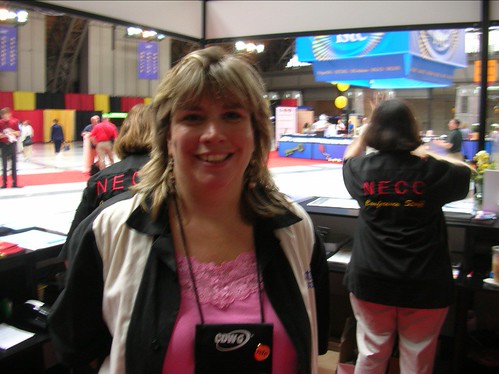
Podcast: Doctor is "In"
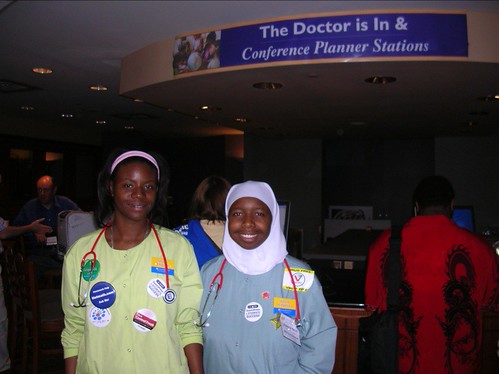
Harry - I interviewed Ed Deydrich and Chanel Lockheart of the Doctor Is "In" booth at NECC 2005. [ mp3 ]
Jun 29, 2005
Info Booth
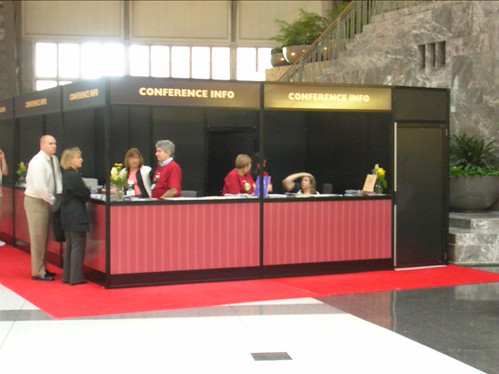
Large space, included representatives from NECC staff, PAETC volunteers, Convention Center staff. Locals are a benefit to help explain local geography. The booth had a large format printout of events (two large-sized pages) per day.
Other comments – many compliments, coupled with some small defect. Bluetooth download stations’ software is not as good as last years’ – they were missing the capability to zoom in on maps. Last day bag storage (not that this is managed by the Info booth) should be extended to include all conference days, but in the meantime, they are recommending that attendees use the Marriott or their own hotel.
More to come...
The Doctor Is "In", Conference Planning Tech Center
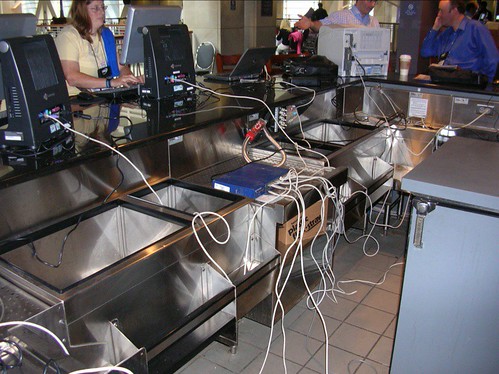
Provides printing, browsing and conference planning assistance. The tools provided were Gateway profile machines and laser printers. They were set up on what is clearly a bar, complete with bar stools. Four desktops are set up with two tall printers. Extra paper is available. Will check on ink.
Other comments - located in out of the way location, but near exhibit hall. Offered during minimal hours. The printers were not correctly set up for day 1 on Tuesday, so they were not functional. Day 2 didn’t start until 10:00am.
More to come....
Jun 25, 2004
EXTRA CREDIT - BY POPULAR DEMAND!!
A few of you have approached me about other extra-credit activities.
Because I'm a softie at heart, I will relent.
While not officially sanctioned by NU, I will allow those of you who answer all three short essay questions instead of 2 of the 3 to be eligible for an additional 3 points (that's the equivalent of an additional 30% on the Final Exam - quite generous, I think!). Depending on the quality of the answer, you could get 0, 1, 2 or 3 points in bonus.
Here are the rules:
1) You CANNOT work on this during the presentations tomorrow.
2) You must have this turned in to me via email (no hard copies in my box) by noon Tuesday, June 29.
3) If you are an insomniac and somehow succeed in completing this before 8am tomorrow, you may give me a hard copy then.
4) If you resort to any sort of plagiarism in this short essay, I will give you a zero for all three short essay questions.
No questions asked.
No room for argument.
5) Please identify this as EXTRA CREDIT in the subject line of the email for easy identification.
6) Circle your initials on the sign-in sheet tomorrow to let me know tomorrow that you will be attempting this.
Good luck.
Three points can make the difference between a B+ and an A-.
Mike
Because I'm a softie at heart, I will relent.
While not officially sanctioned by NU, I will allow those of you who answer all three short essay questions instead of 2 of the 3 to be eligible for an additional 3 points (that's the equivalent of an additional 30% on the Final Exam - quite generous, I think!). Depending on the quality of the answer, you could get 0, 1, 2 or 3 points in bonus.
Here are the rules:
1) You CANNOT work on this during the presentations tomorrow.
2) You must have this turned in to me via email (no hard copies in my box) by noon Tuesday, June 29.
3) If you are an insomniac and somehow succeed in completing this before 8am tomorrow, you may give me a hard copy then.
4) If you resort to any sort of plagiarism in this short essay, I will give you a zero for all three short essay questions.
No questions asked.
No room for argument.
5) Please identify this as EXTRA CREDIT in the subject line of the email for easy identification.
6) Circle your initials on the sign-in sheet tomorrow to let me know tomorrow that you will be attempting this.
Good luck.
Three points can make the difference between a B+ and an A-.
Mike


Jun 21, 2004
Take-Home Final, Part III
Part III – Short Essays (60%) – to be completed on your own and delivered to me (in person or via email) by Saturday, June 26, 12pm.
Below are three topics selected from your reading. Please answer ONLY 2 (two) of the 3 (three) topics with 3-5 paragraph essays. APA format should be followed with regard to citing sources only.
Topics:
1. Critics claim that use of PowerPoint in the classroom can limit student thinking and actually hinder learning (Power Corrupts. PowerPoint Corrupts Absolutely. Wired, Sept. 2003 www.wired.com/wired/archive/11.09/ppt2.html | pdf |
Do you agree or disagree with this perspective? Why?
2. Looking at the three roles of technology that we have analyzed in this course: tool, tutor and tutee; which role of technology offers the most value to educators? Discuss.
3. Describe a classroom in which the technology is well utilized and being used ethically by all participants. What would this classroom look like? How would this teacher use technology as tool, tutor and tutee?
Below are three topics selected from your reading. Please answer ONLY 2 (two) of the 3 (three) topics with 3-5 paragraph essays. APA format should be followed with regard to citing sources only.
Topics:
1. Critics claim that use of PowerPoint in the classroom can limit student thinking and actually hinder learning (Power Corrupts. PowerPoint Corrupts Absolutely. Wired, Sept. 2003 www.wired.com/wired/archive/11.09/ppt2.html | pdf |
Do you agree or disagree with this perspective? Why?
2. Looking at the three roles of technology that we have analyzed in this course: tool, tutor and tutee; which role of technology offers the most value to educators? Discuss.
3. Describe a classroom in which the technology is well utilized and being used ethically by all participants. What would this classroom look like? How would this teacher use technology as tool, tutor and tutee?
Jun 18, 2004
Essay #2
I've provided a Cognitive Theorists primer. Feel free to download it here to assist you with your essay.
Jun 16, 2004
Internet Assignment #6 - LAST ONE!
Adding Value to Teaching
Astro-Venture is an educational, interactive, multimedia web environment where students in grades 5-8 role-play NASA occupations, as they search for and build a planet with the necessary characteristics for human habitation. Please explore it.
Ask yourself, "Does this multimedia learning environment add value to teaching, in a manner in which text or a book with pictures cannot do?"
http://quest.arc.nasa.gov/projects/astrobiology/astroventure
What you do: Write your opinion about this question in a half page, single spaced document: "Does this multimedia learning environment add value to teaching, in a manner in which text or a book with pictures cannot do?"
Post or email by:
DUE DATE: June 24
Astro-Venture is an educational, interactive, multimedia web environment where students in grades 5-8 role-play NASA occupations, as they search for and build a planet with the necessary characteristics for human habitation. Please explore it.
Ask yourself, "Does this multimedia learning environment add value to teaching, in a manner in which text or a book with pictures cannot do?"
http://quest.arc.nasa.gov/projects/astrobiology/astroventure
What you do: Write your opinion about this question in a half page, single spaced document: "Does this multimedia learning environment add value to teaching, in a manner in which text or a book with pictures cannot do?"
Post or email by:
DUE DATE: June 24
Jun 15, 2004
Internet Assignment #5
After Hall Davidson's presentation on Wednesday, your Internet Assignment is to browse through this web site for information on copyright laws and software on the web:
http://fairuse.stanford.edu
The Stanford Fair Use web site will open a new window for you to view its information. Please write a small paragraph on the differences between the impact of copyright and fair use in the classroom.
Optional (but both good!): For additional Copyright information, you can read Hall Davidson’s article on TechLearning (www.techlearning.com/db_area/archives/TL/2002/10/copyright.html), or A Visit to Copyright Bay (www.stfrancis.edu/cid/copyrightbay/).
These two sites also provide excellent information on copyright.
Please email or post your reply.
DUE DATE: June 22
http://fairuse.stanford.edu
The Stanford Fair Use web site will open a new window for you to view its information. Please write a small paragraph on the differences between the impact of copyright and fair use in the classroom.
Optional (but both good!): For additional Copyright information, you can read Hall Davidson’s article on TechLearning (www.techlearning.com/db_area/archives/TL/2002/10/copyright.html), or A Visit to Copyright Bay (www.stfrancis.edu/cid/copyrightbay/).
These two sites also provide excellent information on copyright.
Please email or post your reply.
DUE DATE: June 22
Jun 14, 2004
Essay #1 NOTE
Please email and/or print out a hard copy of your essay when you want to turn it in. DO NOT POST it on the blog.
Thanks!
Mike
Thanks!
Mike
Jun 10, 2004
Internet Assignment #4 - WebQuests
The saga continues....
This will be an exploration into the world of WebQuests in the classroom. Please start your adventure by going to San Diego State's WebQuest site at www.webquest.org, click on the Top or Middling section of th enavigation bar on the left, and explore the level of education of your choice. The grade levels are listed in bold colors at the top of the matrix, and the curricular areas are on the left. Choose three webquests from any curricular areas. You are free to choose more than one from the same curricular area. The grade levels should be the most appropriate for your teaching.
List the lesson title, curriculum area, grade level, and URL (web address) for each of the three webquests. Then describe the PROCESS identified for each webquest you chose. Finally, compare the three webquests in their use of the web to enhance the curricular lesson. Show differences and similarities in the use of Internet tools and web resources.
NOTE: You may want to think ahead during this activity to the WebQuest on which you will base your non-linear presentation. This assignment could provide you with the chance to evaluate several to find the one most suited to your presentation.
Post or email your reply by:
DUE DATE: June 17
This will be an exploration into the world of WebQuests in the classroom. Please start your adventure by going to San Diego State's WebQuest site at www.webquest.org, click on the Top or Middling section of th enavigation bar on the left, and explore the level of education of your choice. The grade levels are listed in bold colors at the top of the matrix, and the curricular areas are on the left. Choose three webquests from any curricular areas. You are free to choose more than one from the same curricular area. The grade levels should be the most appropriate for your teaching.
List the lesson title, curriculum area, grade level, and URL (web address) for each of the three webquests. Then describe the PROCESS identified for each webquest you chose. Finally, compare the three webquests in their use of the web to enhance the curricular lesson. Show differences and similarities in the use of Internet tools and web resources.
NOTE: You may want to think ahead during this activity to the WebQuest on which you will base your non-linear presentation. This assignment could provide you with the chance to evaluate several to find the one most suited to your presentation.
Post or email your reply by:
DUE DATE: June 17
Wednesday, June 16 - Field Trip Info
We will not be meeting at NU for our Thursday meeting, June 17. Instead, please join me at 6:00pm on Wednesday, June 16 at:
KOCE-TV | map |
15751 Gothard St.
Huntington Beach, CA 92647
[it's just up the 405 from NU....exit Beach South, turn right on Center, park at Goldenwest College, walk towards the KOCE sign, enter through sliding double door lobby]
Please post any questions you may have as a reply to this post.
KOCE-TV | map |
15751 Gothard St.
Huntington Beach, CA 92647
[it's just up the 405 from NU....exit Beach South, turn right on Center, park at Goldenwest College, walk towards the KOCE sign, enter through sliding double door lobby]
Please post any questions you may have as a reply to this post.
Jun 8, 2004
Internet Assignment #3
Hello my hearty students!
Assignment three introduces us into the wild and woolly world of Information Literacy (also known as infolit). Richard K. Moore is the Orange County Department of Education Librarian. His professional library is housed here: www.ocde.us/library
Your task: explore the OCDE librarian's Information Literacy site:
www.ocde.us/infolit
Pick any sites or downloads from this page to help you answer the following two questions:
1. What are the "Big Six" Information Literacy skills for K-12 students?
2. How could you incorporate each of these into your classroom lessons and/or activities?
Complete your answer as a post or email.
DUE DATE: June 15
Assignment three introduces us into the wild and woolly world of Information Literacy (also known as infolit). Richard K. Moore is the Orange County Department of Education Librarian. His professional library is housed here: www.ocde.us/library
Your task: explore the OCDE librarian's Information Literacy site:
www.ocde.us/infolit
Pick any sites or downloads from this page to help you answer the following two questions:
1. What are the "Big Six" Information Literacy skills for K-12 students?
2. How could you incorporate each of these into your classroom lessons and/or activities?
Complete your answer as a post or email.
DUE DATE: June 15
Jun 5, 2004
Thursday, June 10 - Field Trip Info
We will not be meeting at NU for Thursday, June 10. Instead, please join me at 5:30pm at:
The Apple Store, South Coast Plaza | map |
3333 Bear St.
Costa Mesa, CA 92626
[it's just down the street from NU....in the old "Crystal Court" between Borders and the Merry-Go-Round, by the elevator]
We'll break for dinner at 6:45pm and reconvene at 7:30 at:
Orange County Department of Education | map |
200 Kalmus Dr.
Building B - Educational Technology
Costa Mesa, CA 92626
[plan on a 5 minute drive, and go to the Westernmost gate of the OCDE campus, park along the side of building B, enter through double doors marked "Technology Center"]
Please post any questions you may have as a reply to this post.
The Apple Store, South Coast Plaza | map |
3333 Bear St.
Costa Mesa, CA 92626
[it's just down the street from NU....in the old "Crystal Court" between Borders and the Merry-Go-Round, by the elevator]
We'll break for dinner at 6:45pm and reconvene at 7:30 at:
Orange County Department of Education | map |
200 Kalmus Dr.
Building B - Educational Technology
Costa Mesa, CA 92626
[plan on a 5 minute drive, and go to the Westernmost gate of the OCDE campus, park along the side of building B, enter through double doors marked "Technology Center"]
Please post any questions you may have as a reply to this post.
Jun 3, 2004
Internet Assigment #2
Please choose one of the following and post or email your reply:
1) Online Learning:
Visit these three web portals below:
Atomic Learning: www.atomiclearning.com
Virtual Training: ctap.ocde.us
Brain POP: www.brainpop.com
For the first two, login with the usernames and passwords I will send you via email (I'm reluctant to post these here). For BrainPOP, you can explore up to two animations a day.
Write a paragraph discussing each sites' strengths and weaknesses. Note: the first two are geared for teacher professional development, while the last one is for DIRECT student instruction. You are not comparing and contrasting these, but analyzing strengths and weaknesses.
or
2) Software Evaluation:
Evaluate one instructional software program for children using the form linked below:
www.superkids.com
You do not need to purchase any software for this assignment. Many public libraries, schools and districts have software available for evaluation; or you can visit the OCDE Learning Resource Display Center in Santa Ana [714.541.1052] - 1715 East Wilshire, St. 713, Santa Ana. You can also look to your schools to evaluate instructional software that may be in use at your school already. Do not evaluate any software we used in class. The software must be educational in nature, and/or used for educational purpose. You can view a list of great instructional software at www.clrn.org , if you need help finding a possiblity. Many of these have downloadable demos you can use to complete your evaluation.
Superkids.com has given us copyright permission to use the evaluation form linked above, courtesy of Professor Tom Stubbs.
DUE DATE: June 12 (NOTE: I've given you two extra days here, because I feel your pain...)
1) Online Learning:
Visit these three web portals below:
Atomic Learning: www.atomiclearning.com
Virtual Training: ctap.ocde.us
Brain POP: www.brainpop.com
For the first two, login with the usernames and passwords I will send you via email (I'm reluctant to post these here). For BrainPOP, you can explore up to two animations a day.
Write a paragraph discussing each sites' strengths and weaknesses. Note: the first two are geared for teacher professional development, while the last one is for DIRECT student instruction. You are not comparing and contrasting these, but analyzing strengths and weaknesses.
or
2) Software Evaluation:
Evaluate one instructional software program for children using the form linked below:
www.superkids.com
You do not need to purchase any software for this assignment. Many public libraries, schools and districts have software available for evaluation; or you can visit the OCDE Learning Resource Display Center in Santa Ana [714.541.1052] - 1715 East Wilshire, St. 713, Santa Ana. You can also look to your schools to evaluate instructional software that may be in use at your school already. Do not evaluate any software we used in class. The software must be educational in nature, and/or used for educational purpose. You can view a list of great instructional software at www.clrn.org , if you need help finding a possiblity. Many of these have downloadable demos you can use to complete your evaluation.
Superkids.com has given us copyright permission to use the evaluation form linked above, courtesy of Professor Tom Stubbs.
DUE DATE: June 12 (NOTE: I've given you two extra days here, because I feel your pain...)
Essay #1 Topic
Please choose from the list below for your Essay #1 topic and post your choice as a response to this post. If you have another topic you'd like to suggest, please post your suggestion. I'll reply on its suitability.
Topics:
Wirless Networking
1:1 Computing Initiatives (1 laptop per student)
Handheld Technology
Probes and Data Analysis
Word-Processing Software
Presentation Software
Simulation Software
Instructional Television
Video Editing/Creation
Online Research
Digital Photography
Web Publishing (or, as an option: Blogging)
Student Data Management Systems
Student ePortfolios
or.... YOUR OWN TOPIC!
TOPIC SELECTION DUE DATE: June 8
DUE DATE: June 15
View essay rubric
Topics:
Wirless Networking
1:1 Computing Initiatives (1 laptop per student)
Handheld Technology
Probes and Data Analysis
Word-Processing Software
Presentation Software
Simulation Software
Instructional Television
Video Editing/Creation
Online Research
Digital Photography
Web Publishing (or, as an option: Blogging)
Student Data Management Systems
Student ePortfolios
or.... YOUR OWN TOPIC!
TOPIC SELECTION DUE DATE: June 8
DUE DATE: June 15
View essay rubric
Internet Assignment 1
Please post or email a reply to one of the following tasks:
1) Go to www.scholastic.com. This website contains 3 portals: one for parents, one for teachers, and one for students. Review all three portals by choosing an activity from each portal. Describe one activity for that portal in your reply and suggest how you might integrate the lesson/activity into a classroom. If you are a high school educator, choose the activity level for the highest grade possible, such as grade 8.
or
2) Go to www.dreamms.org . This assistive technology information clearinghouse has articles, products and a focus on technologies for students with special needs. Please click on the word "LINKS" in the left frame of the website, and when you see the new page with many resources, scroll down to the section labeled: "Corporate, Software and Special Education Organization Destinations." Choose three links from this section, explore their resources and write a small paragraph about each link.
DUE DATE: June 10
1) Go to www.scholastic.com. This website contains 3 portals: one for parents, one for teachers, and one for students. Review all three portals by choosing an activity from each portal. Describe one activity for that portal in your reply and suggest how you might integrate the lesson/activity into a classroom. If you are a high school educator, choose the activity level for the highest grade possible, such as grade 8.
or
2) Go to www.dreamms.org . This assistive technology information clearinghouse has articles, products and a focus on technologies for students with special needs. Please click on the word "LINKS" in the left frame of the website, and when you see the new page with many resources, scroll down to the section labeled: "Corporate, Software and Special Education Organization Destinations." Choose three links from this section, explore their resources and write a small paragraph about each link.
DUE DATE: June 10
Subscribe to:
Posts (Atom)


